




























Easy guide on how to use the iQOO Gamepad

Hey iQOO fans,
If you have recently got the iQOO Gamepad and not able to connect with your smartphone, then please do read this easy guide.
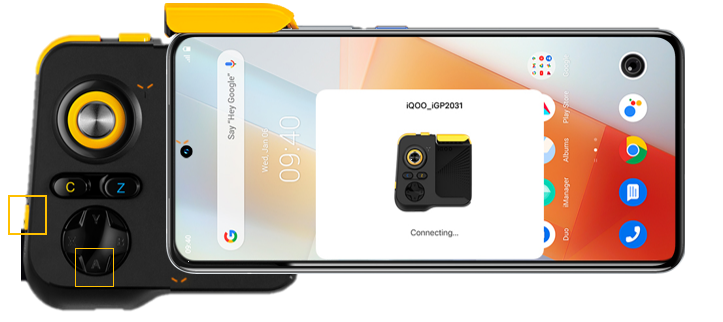
Step 1: Connect an iQOO Phone with iQOO Gamepad
1. Turn on the Bluetooth on the phone. Press button A of the gamepad and turn the power switch to “ON”, the orange light will flash, indicating the gamepad is ready to be paired. 2. Hold it near the gamepad and a connection window will automatically pop up. Tap “Connections", and then select“Pair”. The devices are now successfully connected. If not please go to Bluetooth setting and search for iQOO_iGP2031.
3. Go to phone Settings, find “Ultra Game Mode”, add the game to be played to the whitelist to avoid gamepad functioning issues.
Step 2: How to open peripherals setting
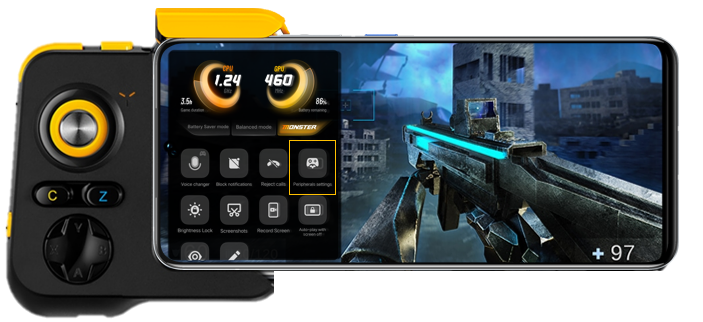
1. Please open the game (BGMI)
2. Swipe right to reveal the Ultra Game Mode menu on the left.
3. Tap “Peripherals settings to see the multiple keys of gamepad UI.
Step 3: Setting the gamepad button positions
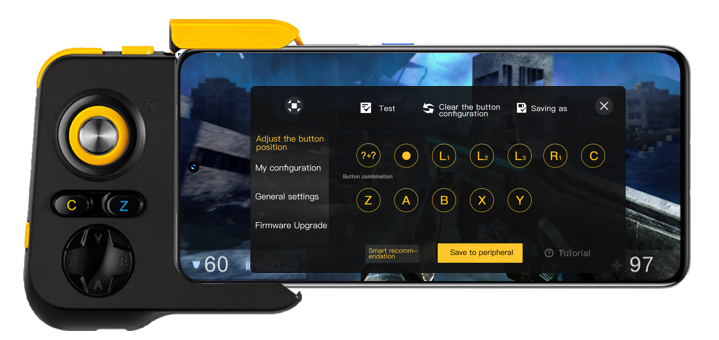
- After clicking peripheral setting menu, you get multiple gamepad keys to align the task according to your preferences for example (fire, Scope etc.)
- Drag the icons on the pop-up window to the desired settings.
- Tap a button and enter button setting to change its size, delete it, or move it to somewhere else;
- Tap the selected button again to set its attributes and then tap ok;
- After the setting is completed, tap “Save to peripheral”.
Important notes:
- Make sure the game already added in “Ultra Game Mode” to explore the “Peripherals Setting”.
- After setting a template for the button positions, you need to tap “save to peripheral” to apply it.
- When you need to change a button positions or change the configuration scheme, you need to re-select a configuration scheme, enter setting and save it to the peripheral.
Let us know in comments if this was helpful. Also if you are currently using the iQOO Gamepad, please do share your reviews.
Regards
Team iQOO Connect
Please sign in
Login and share