



























Introducing Origin Island: iQOO's New Smart Hub in OriginOS 6

The arrival of OriginOS 6 on iQOO devices marks a significant evolution in user interface, bringing features previously exclusive to the Chinese market to the global stage. Among the most innovative and talked-about additions is Origin Island—a smart, dynamic hub designed to deliver real-time information and boost productivity with AI-driven convenience.
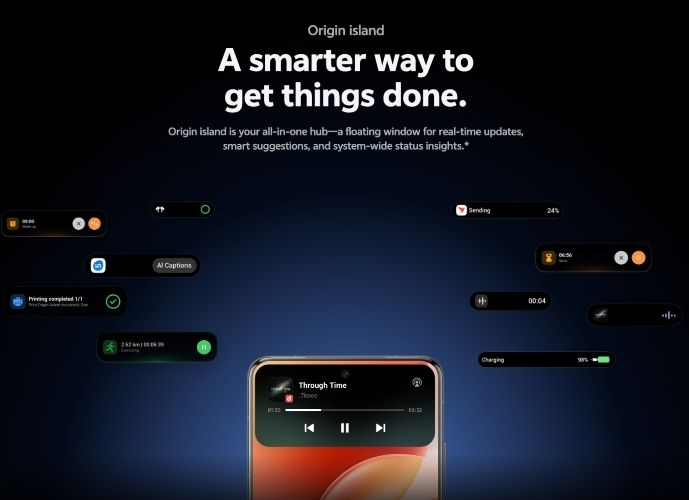
Origin Island takes inspiration from modern, context-aware notification systems, transforming how users interact with live system events and copied content.
What is Origin Island?
Origin Island is a dynamic, persistent notification and activity hub that appears at the top of your screen. Unlike static notification icons, it intelligently morphs its size and content to display real-time updates and provide quick, contextual actions.
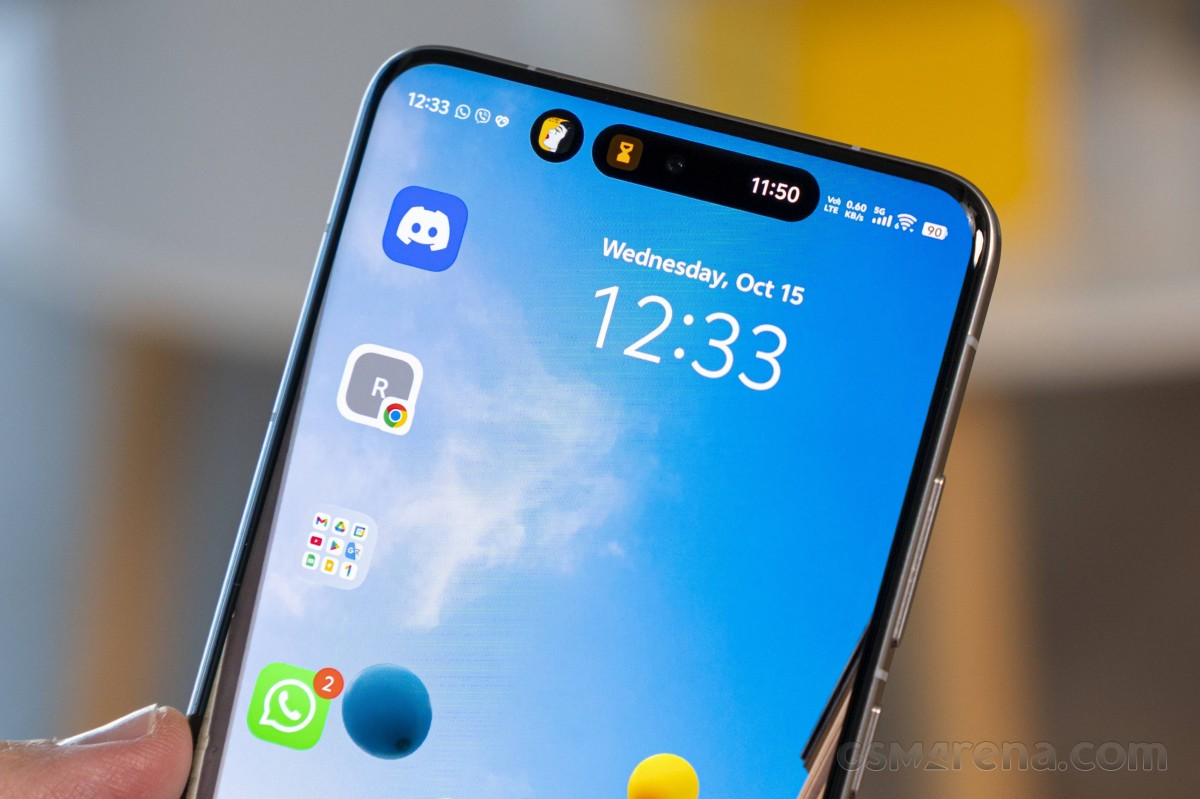
It effectively unifies scattered information—like background app activity, media playback, system status, and copied data—into one cohesive, actionable area.
✨ Key Features and How to Use Origin Island
Origin Island's core power lies in its ability to adapt based on what you are doing, streamlining multi-step actions into fluid, instantaneous interactions.
1. Contextual Real-Time Updates
Origin Island continuously shows you critical information without needing to pull down the notification shade.
- System Status: When you connect a Bluetooth device, start a screen recording, or connect a charger, Origin Island visually confirms the activity and status.
- Live Activities: It handles ongoing background tasks such as:
- Music/Media Playback: Providing controls for skipping tracks or pausing.
- Timers & Alarms: Displaying countdowns at a glance.
- Voice/Video Calls: Showing the call status and duration.
2. 🖱️ Drag & Go: Effortless Content Sharing
This is one of the most powerful productivity boosters in Origin Island. It allows you to drag content directly from the Island into another app, cutting out multiple taps and menu navigation.
- Scenario: You copy a photo from the Gallery.
- How it Works: The image appears briefly on Origin Island. You can then tap, hold, and drag the image icon from the Island directly onto a WhatsApp chat or an email draft to attach it instantly.
3. 📝 Copy & Go: Instant Action on Copied Text
Origin Island instantly analyzes copied text and suggests the most logical next action, saving you time switching between apps.
- Scenario 1: Copying a Phone Number.
- Action: Copy the number. Origin Island immediately suggests a Call action or a Save to Contacts action.
- Result: Tap the suggested action to launch the dialer or contacts app pre-filled with the number.
- Scenario 2: Copying a Date/Time.
- Action: Copy the date (e.g., "Meeting on Tuesday at 4 PM"). Origin Island suggests Create Calendar Event.
- Result: Tap the suggestion to open the Calendar app with the date and time already entered.
- Scenario 3: Copying an Address.
- Action: Copy the address. Origin Island suggests Open in Maps.
🌟 Why Origin Island Matters to iQOO Users
For iQOO's user base, often focused on performance and gaming, Origin Island integrates a layer of smart efficiency into the high-speed system:
- Minimized Interruption: It provides crucial updates (like charging status or music controls) in a non-intrusive way, preserving the immersion, especially during gaming.
- Fluid Workflow: The Drag & Go and Copy & Go features accelerate everyday tasks, supporting the "Fast & Monster" identity of iQOO devices.
- System Cohesion: It is a visible element of OriginOS 6's overall focus on a more interconnected and context-aware software experience, moving away from fragmented menus and settings.
Origin Island is more than a notification display; it's an AI-powered hub that anticipates your next move, making the entire iQOO experience under OriginOS 6 feel faster, smarter, and more integrated.
Please sign in
Login and share