



























Master Multitasking: How to Use the Game Sidebar & Small Window on iQOO Device

Hey Questers👋,
For iQOO gamers, staying in the zone is everything. But what happens when you need to reply to a quick WhatsApp message or check a walkthrough without quitting your session?
That’s where the Game Sidebar and Small Window feature comes in. Included in the Ultra Game Mode on Funtouch OS/Origin OS6, this tool allows you to pull up a mini-version of your favorite apps directly over your gameplay.
🚀 How to Enable the Game Sidebar
Before you can use the small window, you need to ensure the sidebar is active:
* Open Settings on your iQOO device.
* Scroll down and tap on Ultra Game Mode.
* Ensure the Game Sidebar toggle is turned ON.
* Launch any game. You will see a transparent "translucent bar" on the left edge of your screen.
📱 Opening Apps in "Small Window" Mode
Once you're in a game, follow these steps to multitask like a pro:
* The Swipe: Swipe inward from the side of the screen where the sidebar indicator is located.
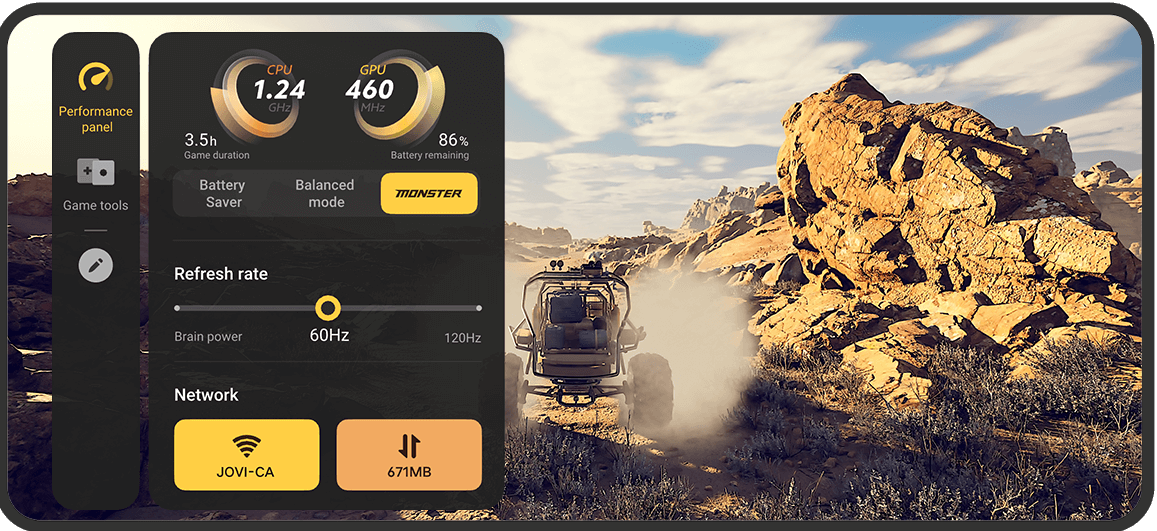
* The Selection: The sidebar will expand, showing performance stats (like CPU/GPU usage) and a list of app icons.
* The Launch: Tap any supported app (like WhatsApp, Telegram, or Chrome).
* The Result: The app will open in a Small Window (Floating Window) on top of your game.
> Pro Tip: You can drag the top bar of the small window to move it anywhere on the screen, or drag the corners to resize it!
🛠 Why Use It?
* Instant Replies: Reply to messages without the "AFK" (Away From Keyboard) risk.
* Performance Monitoring: Quickly toggle between Battery Saver, Balanced, and Monster Mode to boost your FPS.
* Quick Tools: Access screen recording, screenshots, and brightness locks instantly.
⚠️ A Few Things to Note
* App Compatibility: Not every app supports Small Window mode. Most social media and messaging apps work perfectly, but some heavy utility apps might not.
* Customization: You can edit which apps appear in your sidebar by tapping the Edit/Plus (+) icon at the bottom of the app list in the sidebar.
Follow me ➡️ @TechieGuyfor more such amazing content 🤘 🤩.
Please sign in
Login and share