



























Quick Update on OriginOS 6 Beta Rollout 📱🚀

Hi Questers,
We know the excitement is high, but there:s been some confusion regarding who gets the update and when. This thread is your go-to guide for understanding the current status, the registration process, and how to ensure a safe installation.
Excited about the new OriginOS 6?
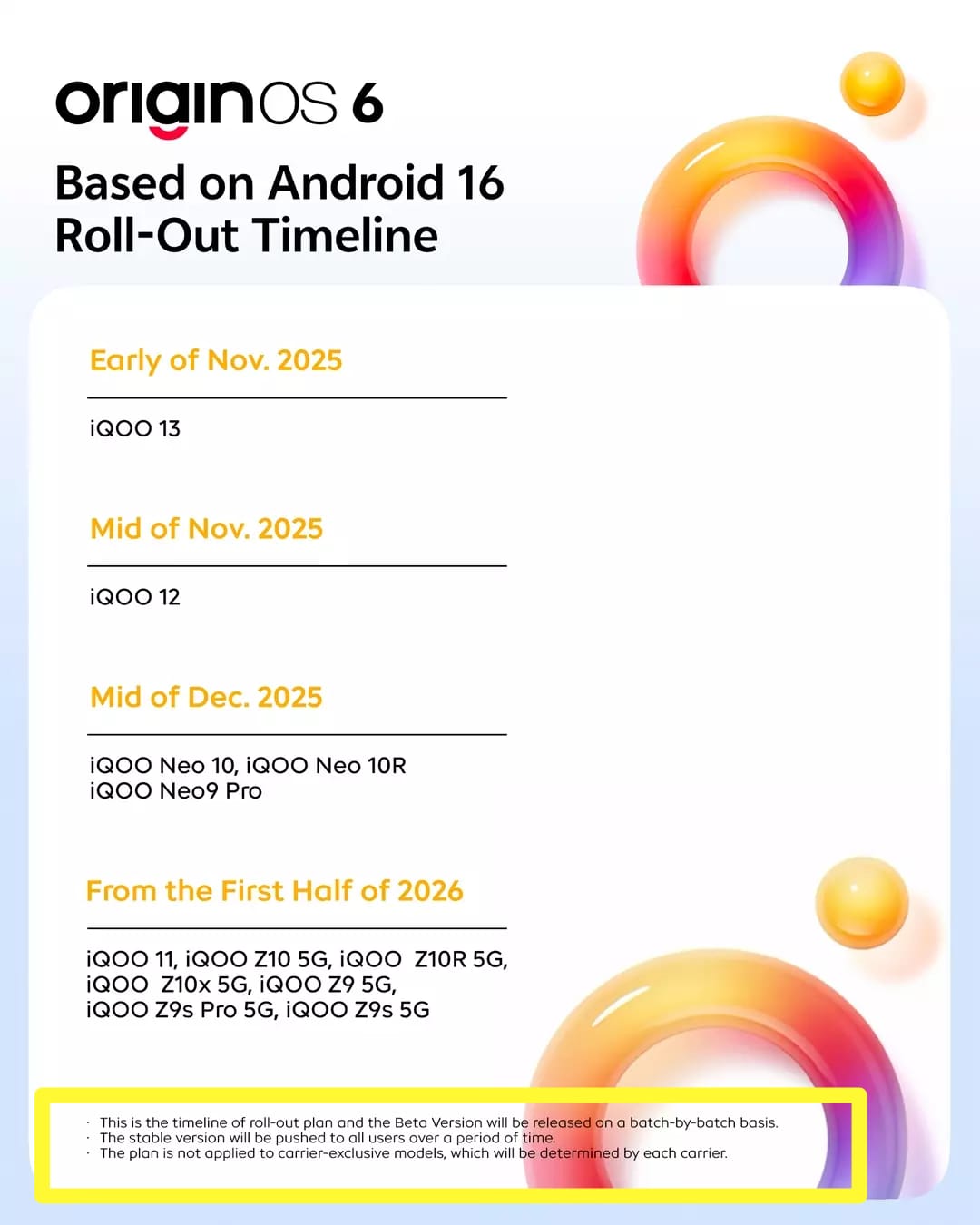
A quick clarification: The schedule currently circulating is for the Beta Update, not the Public/Stable release. Check the image below for the specific timeline for your device! 📅👇
Wondering why some users already have the update? 🧐
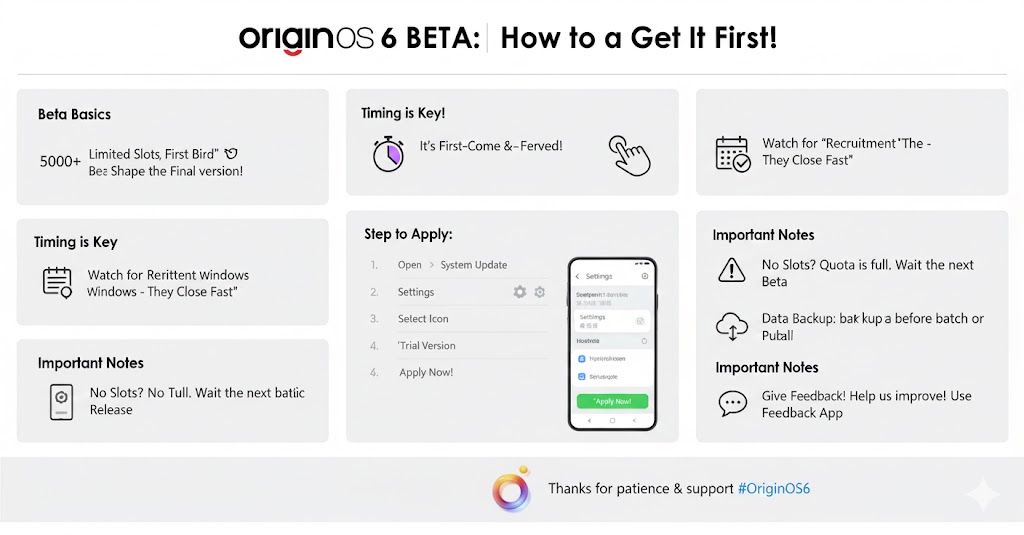
The "First-Come, First-Served" Rule The Beta recruitment isn't open to everyone at once. When a new version like OriginOS 6 is ready for testing, the system opens a specific number of "seats" (e.g., 5,000 or 10,000 slots per model). Once those slots are claimed in the Beta Application section of the settings, the recruitment closes. If you didn't click "Apply" in time, you have to wait for the next batch.
Testing for Stability: We don't release the Beta to everyone because it is still a "work in progress." By limiting the number of users, our developers can:
- Monitor Logs: Closely track how the update performs on a smaller group of devices.
- Quick Fixes: If a critical bug is found (like a battery drain or app crash), it only affects a small percentage of users rather than the entire community.
- Feedback Loop: Beta testers provide feedback that helps us polish the Stable Public Release
The Registration Window Registration usually happens in "Waves."
- Wave 1: Usually for the most active community members and early applicants (Closed Beta).
- Wave 2: A larger group of users (Open Beta).
- Public Release: Once all the feedback from Waves 1 & 2 is implemented, the update is pushed to every single user
Why "Trial Version" Matters Many users wait for a push notification, but beta updates rarely send one.
You have to manually "grab" your slot by going to:
- Settings > System Update > Settings Icon > Trial Version
If you see "No test version available," it means the current quota for your model is full, and you’ll need to wait for the next batch or the final public rollout.
How to check for the update? 🔍
Don't just wait for a notification! Follow these steps:
1️⃣ Go to Settings > System Update.
2️⃣ Tap the Settings icon (top right)
3️⃣ Look for the Trial Version (or Version Trial) section.
Pro Tip for a Smooth Install:
Always download your software updates over a stable Wi-Fi connection. Mobile data can sometimes be inconsistent, leading to missing packets or corrupted files during the download. To ensure your device safety and a successful installation, stick to Wi-Fi! 🛡️⚡"
Data Saftey:
- Since this is a Beta, please ensure you back up your important data first. We are working hard to polish the experience so the stable version is perfect for your daily use. 💎
Thank you for your incredible patience! As a brand, we thrive on providing the latest features and updates as fast as possible. We're committed to bringing the smooth OriginOS 6 experience to every eligible device soon.
Thanks
Please sign in
Login and share