



























YouTube is testing a new way to help you watch videos faster, but you'll have..

YouTube is testing a new way to help you watch videos faster, but you'll have to pay up
The new "Auto Speed" feature dynamically adjusts playback speed, while "On the go" gives you easier controls on the move.
The primary reason to get a YouTube Premium subscription is to avoid ads, especially given how long they’ve gotten recently. But if you pay up, YouTube also gives you access to experimental features. The latest “Auto Speed” YouTube experiment helps you save time while watching videos by dynamically speeding them up as needed. There’s also a new “On-the-go” control view that makes it easier to control playback while you’re on the move.
New YouTube Premium experiment: Auto Speed
We’ve spotted a new “Auto Speed” feature present in the experimental features section of the YouTube app.
As the description states, Auto Speed automatically adjusts the playback speed throughout the video, claiming to save you time without sacrificing comprehension.
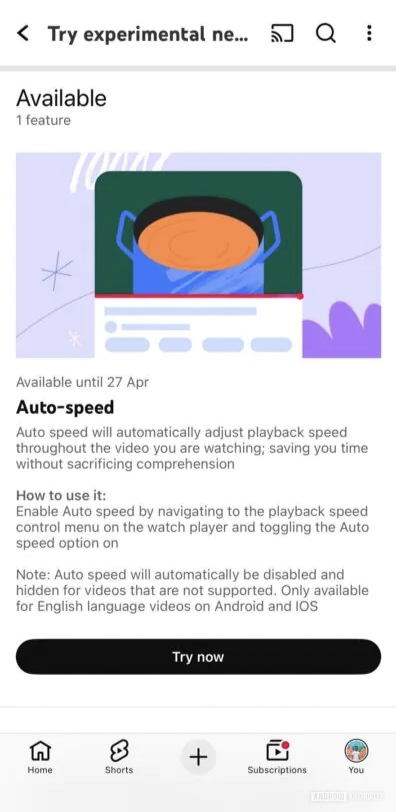
The description says Auto Speed will be disabled and hidden for unsupported videos, but we couldn’t find it on several English-language videos on Android and iOS, where it should have been visible.
New YouTube Premium experiment: On-the-go
Alongside this, YouTube is also offering On-the-go controls as another experimental Premium feature. This mode is targeted towards audio-centric videos such as podcasts and talk shows. It is meant to make it easier to control video playback without distractions from comments and other visual elements.
YouTube mentions that On-the-go can be activated manually at any time by tapping the Settings gear icon in the top right of an active video, then navigating to More > Premium controls. On-the-go is also suggested as a prompt when your phone detects motion for at least 60 seconds while you are listening to or watching a video with your phone unlocked.
The description states that On-the-go is only available on Android phones, but, curiously, we can access it on iOS as well.
Both of these features were spotted late last month, and they’re now becoming available to more users. Google hasn’t shared any details on whether either of these features will also arrive in the desktop YouTube experience. If you want to give these a try, you have until April 27, after which Google will presumably decide whether to keep the features or scrap them.
Please sign in
Login and share