



























How to edit a sent comment on Instagram: A step-by-step guide

Hey iQOO Fans,
Instagram has introduced the ability to edit comments after posting. This feature helps users fix typos or rephrase messages without deleting and reposting them. However, the option is available only for a limited time after the comment is published.
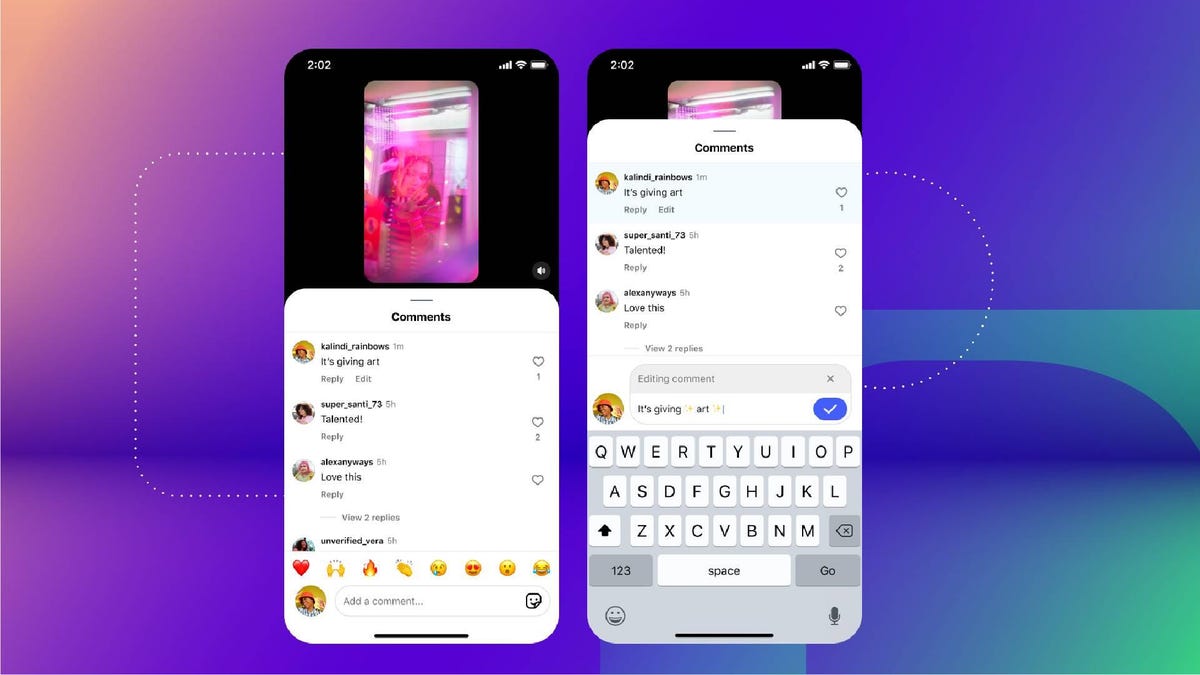
How to edit comments on smartphones
Users can edit comments directly from the Instagram app using the following steps:
1. Open the Instagram application on your smartphone.
2. Navigate to the post where you have posted the comment.
3. Tap on the comment icon to open the comment section.
4. Locate the comment you want to edit.
5. Tap on the comment to access editing options. 6. Make the required changes to the text.
7. Save the edited comment.
You can edit the comment multiple times within the allowed time window.
Time limit and editing rules
Instagram has placed certain conditions on this feature.
• Comments can be edited only within 15 minutes of posting.
• Users can edit the comment multiple times during this period.
• Only the text in a comment can be edited.
• If a comment includes media, only the text portion can be modified.
Once the 15-minute window passes, the edit option will no longer be available.
Visibility of edited comments
When a comment is edited, Instagram indicates that the comment has been modified. This ensures transparency in conversations. However, the platform does not show previous versions of the comment, meaning edit history is not visible to others.
Why this feature matters
The ability to edit comments reduces the need to delete and repost messages. It improves communication, especially in fast-paced discussions where small mistakes can change the meaning of a comment.
Source:Moneycontrol
Sumit
Quester
iQOO Community
Please sign in
Login and share