



























Let's understand Gemini AI in glance through FAQ's

As a tech researcher, my work involves exploring and testing various use cases, scenarios, and applications. During my work, I discovered that Gemini AI possesses several distinctive features. Consequently, I've decided to spotlight Gemini in a dedicated thread for our community, offering a concise overview of its capabilities.
Q1).What is Gemini AI?
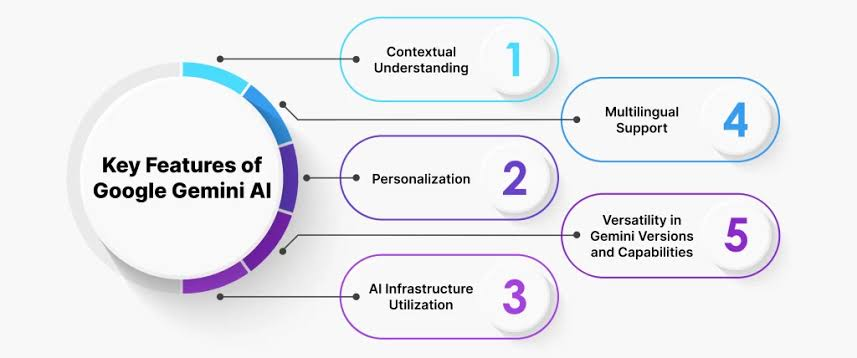
Gemini AI stands as a groundbreaking language model engineered by Google AI, offering users direct interaction with Google AI for writing assistance, planning, learning, and beyond.
Q2). How does Gemini AI works?
Gemini AI employs a blend of methodologies, including:
- Absorbing and analyzing extensive text data: This enables Gemini to grasp language intricacies and furnish pertinent and insightful responses.
- Iterative learning from user engagements: Gemini refines its responsiveness to prompts and inquiries through ongoing interactions.
- Integration with various Google services for data assimilation: This empowers Gemini to furnish comprehensive and enriching responses.
Q3).What can I use Gemini AI for?
Unlock the potential of Gemini AI for various purposes, such as:
- Ideation for creative ventures
- Writing assistance for emails, letters, reports, and more
- Knowledge acquisition through queries and explanations
- Schedule organization for daily or weekly plans
- Language translation tasks.
Q4.Is Gemini AI safe to use?
While Gemini AI is in continuous enhancement, users should exercise caution:
- Recognize that Gemini may occasionally provide inaccurate information; it's advisable to verify responses independently.
- Apply discernment and critical thinking when engaging with Gemini.
- Avoid relying on Gemini for tasks requiring human expertise or judgment, such as significant life decisions.
Conclusion:
As Gemini AI evolves, the horizons of possibilities expand. Embrace the forefront of AI innovation and embark on the journey with us. Engage with Gemini AI to unleash the capabilities of Google AI for writing, planning, learning, and more.
(Info source: Google)
Note:
Most interesting features of Gemini AI:
1)Google drive advance search for documents+files
2) Analyse image files and data with Google Gemini
3)Create a table from the image
4)Google Docs summary/actions
Signing off,
Balaji Murapaka
@Balajibalu_techie
Please sign in
Login and share