



























Truecaller Launches AI-Powered Feature to Detect Scam Calls

Truecaller, the popular caller ID platform, has introduced a new feature that uses artificial intelligence (AI) to help users identify scam calls. This feature, called the AI Call Scanner, can detect whether the voice on the other end of the call is from a real person or an AI. The company highlighted the increasing number of AI voice scams, where scammers use AI to mimic familiar voices to trick people. This feature will first be available in the US.

How the Truecaller AI Call Scanner Works
The AI Call Scanner works by analyzing the caller's voice in real-time and providing results within a few seconds. Here's how it operates:
- Voice Recording: When you receive a suspicious call, the AI Call Scanner records the caller's voice for a few seconds.
- Voice Analysis: The recorded voice is processed using Truecaller's AI model, which can identify the unique characteristics of human speech and distinguish them from AI-generated voices.
- Quick Results: The entire process takes only a few seconds and aims to be highly accurate.
Truecaller explained that their AI model has been trained to detect the differences between human and AI voices effectively. This new feature will be available to Truecaller Premium users with the latest version of the app (version 14.6) on Android. While it is initially being launched in the US, Truecaller plans to roll it out to India and other major markets in the coming months.
Why This Feature is Important
Truecaller highlighted that scammers are increasingly using AI to clone voices from social media videos. These cloned voices are then used to call victims, often sounding like a friend or relative, to trick them into giving money or personal information. Truecaller first noticed these scams in 2019, and their frequency has increased dramatically since then.
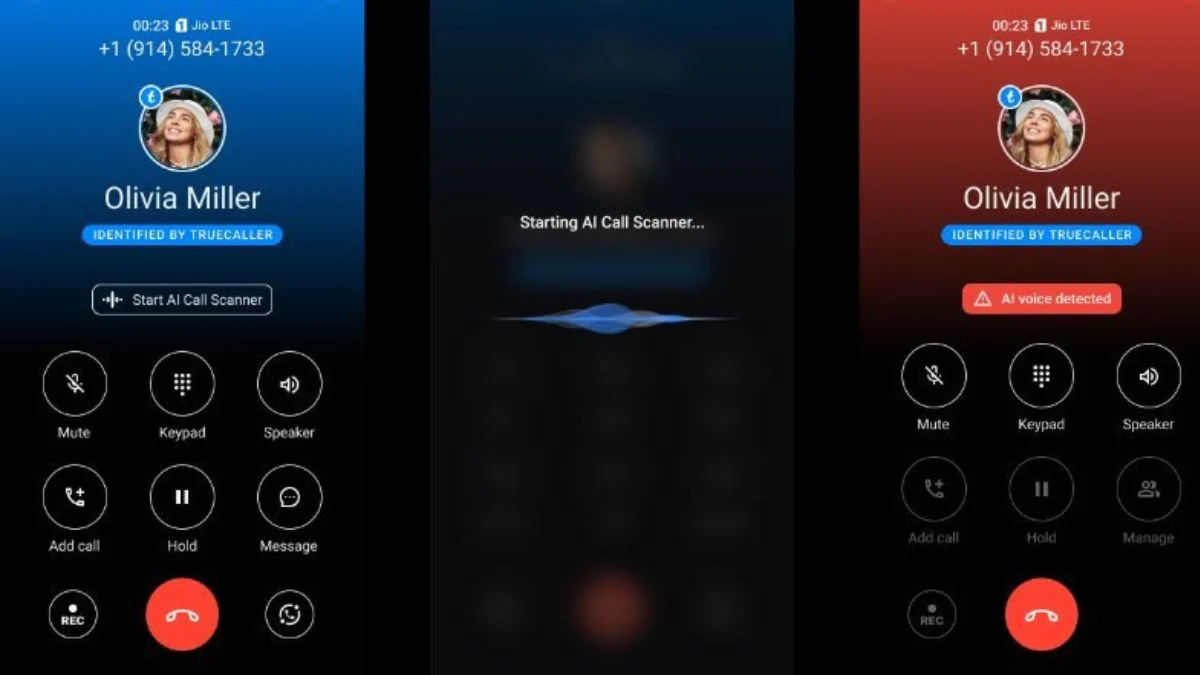
How to Use Truecaller’s AI Call Scanner
Using the AI Call Scanner is straightforward:
- Set Truecaller as Your Default Calling App: Ensure that Truecaller is set as your main calling app on your phone.
- Activate AI Detection: When you receive a suspicious call, tap on "Start AI Detection."
- Hold the Call Briefly: The call will briefly go on hold while the AI records the voice.
- Wait for Analysis: Look for the "Analysing…" message indicating that the AI model is checking the caller's voice.
- Check the Results: You will see an on-screen notification telling you whether the voice is human or AI.
With the launch of the AI Call Scanner, Truecaller aims to provide users with an extra layer of protection against sophisticated AI scams, helping them stay safe from fraudsters who use technology to deceive.
Happy Questing
Please sign in
Login and share