



























Maximizing Performance: Best Tips to Boost Your iQOO Phone's Speed

Hello iQOO Questers and Moderators!
Let's dive into some essential tips to help you optimize the performance of your iQOO smartphone. These tricks will ensure a smooth, lag-free experience, especially if you're a heavy user or a mobile gamer.
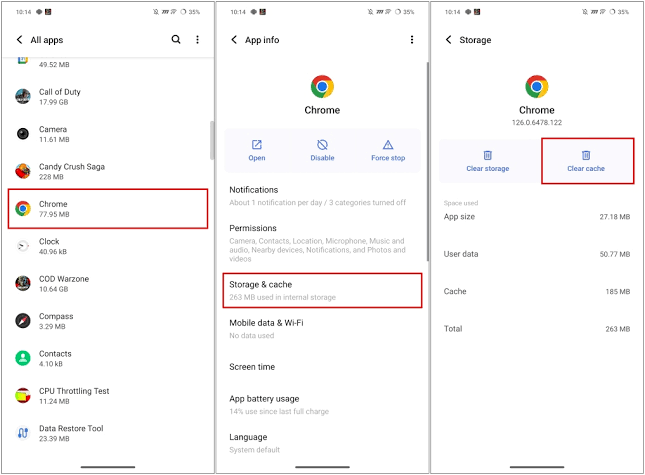
1. Clear Cache Regularly
- Cached data can pile up over time, slowing down your phone.
- Clear the cache from apps you use often, especially browsers and social media apps.
- Go to Settings > Apps > Select the app > Storage > Clear Cache to maintain performance.
2. Limit Background Apps
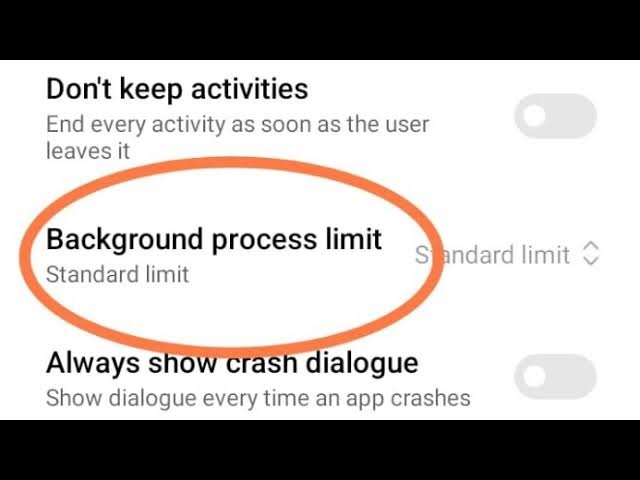
- Too many background apps can drain your system’s resources.
- Disable unnecessary background processes by going to Settings > Battery > Background Power Consumption Management.
- Regularly close apps you’re not using to free up RAM.
3. Use Ultra Game Mode
- iQOO’s Ultra Game Mode enhances gaming performance by allocating system resources efficiently.
- Enable Ultra Game Mode to ensure smooth gameplay and limit distractions.
- You can access this feature by going to Settings > Ultra Game Mode and selecting your preferences.

4. Keep Software Up to Date
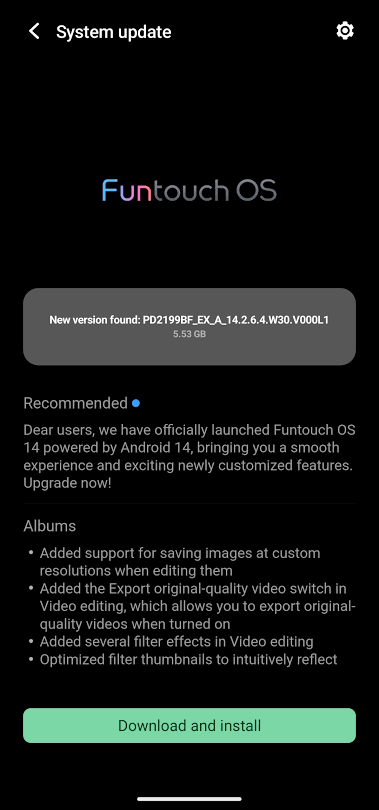
- Regular software updates include performance improvements and bug fixes.
- Make sure your iQOO phone is running on the latest software version to keep things running smoothly.
- Check for updates by going to Settings > System Updates.
5. Use Smart Cleaner
- iQOO phones come with a built-in Smart Cleaner feature that helps optimize performance by clearing junk files.
- Use this feature regularly to remove unnecessary files and free up storage.
- Go to Settings > iManager > Smart Cleaner to initiate a scan and clean.
Conclusion
By following these simple tips, you can significantly boost the speed and performance of your iQOO smartphone. Whether you're gaming or multitasking, these tricks will ensure your phone runs smoothly and efficiently. Keep experimenting with these features and enjoy the top-tier experience iQOO has to offer!
Day 40 Complete of 365 Day Daily Thread challenge 🤗🌸
Have a great day, and I look forward to seeing you again soon.
Best regards,
Sahil Singh
Please sign in
Login and share