



























WhatsApp's multi-account feature: Use 2 accounts in 1 device, here's how

WhatsApp's multiple account support feature lets you juggle between two accounts on Android logged in at the same time. Take a look how at you can use this feature
WhatsApp is amongst the most used messaging applications in India. The regular updates and top features are the major reasons why this platform is still blooming. Last year, the major WhatsApp updates consisted of multiple account support, multi-device support, pinned messages, reply from the lock screen, polls and quizzes, screen share and many more. Here we will follow up on how to use these features. This article delves into the WhatsApp feature of multiple account support.
What is Multiple Account Support feature?
Now, WhatsApp has allowed users to juggle between accounts on the same device. It offers the ability to have two WhatsApp accounts on Android logged in at the same time. This feature is a great help as it eliminates the hassle of carrying two phones at once or logging out each time you need to switch between personal or work chats.
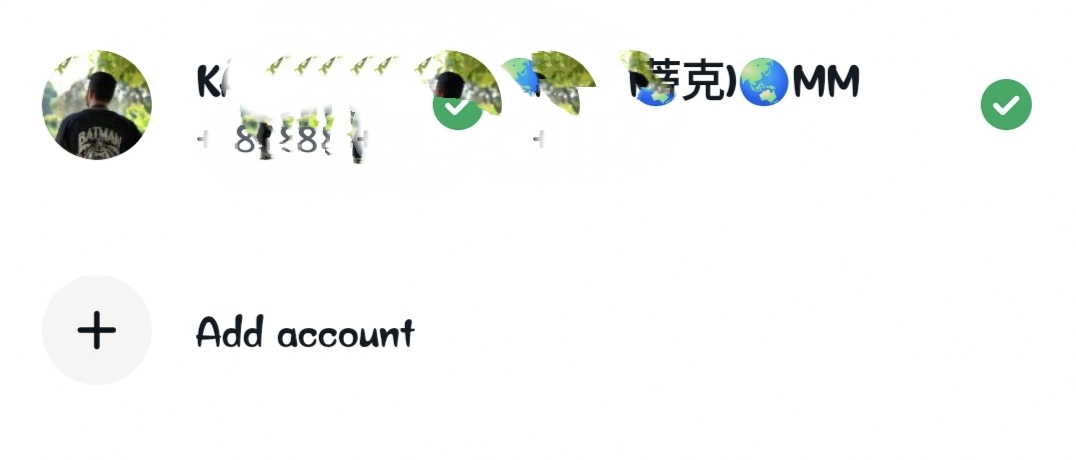
To set up a second account, you will need a second phone number and SIM card, or a phone that accepts multi-SIM or eSIM. Simply open your WhatsApp settings, click on the arrow next to your name, and click “Add account”. You can control your privacy and notification settings on each account.
After you are sure that your application is updated, tap on the three dots menu icon in the upper-right corner and choose Settings. On the settings page, tap on the drop-down option next to your profile tab. The drop-down option will offer you an option to add an account.
Adding an account requires you to add another contact number, after which it will ask you to enter the six-digit verification code. Complete your profile info by choosing a profile picture, typing the profile name you want to have, and tapping on next.
After a while, your second account will be logged in to the same app. You can switch between these accounts using the Switch Accounts option under the three-dot menu in the upper-right corner.
Another way to switch these accounts is from the drop-down option, which we used earlier, next to your profile tab.
Please like and follow your gaming and all knowledge quester @Kvkartikji04
Please sign in
Login and share