



























Basics You need to know for Photo Editing | Shutterbug 🪄

Introduction
Hello Questers ! Hope you all are doing well ✨. This thread is regarding Photo Editing & I'm sharing some basic tips for the same !
Information
Photo Editing 📸🖌️
• What is Photo Editing? Photo editing is the process of altering or enhancing images using various software or apps. Whether it's for professional work, personal projects, or social media, photo editing allows you to transform your photos and bring out their full potential.
• Why Edit Photos? Editing allows you to correct imperfections, adjust lighting and colors, remove distractions, and creatively express your vision. Whether you're enhancing the natural beauty of a photo or creating something entirely new, editing lets you control how the final image looks.
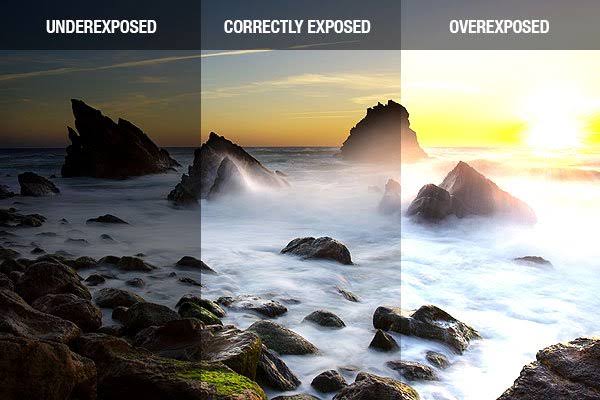
• Basic Photo Editing Tools:
Cropping: One of the simplest edits, cropping helps you remove unwanted elements or adjust the composition of the image.
Exposure/Contrast: Adjusting exposure brightens or darkens the image, while contrast increases or decreases the difference between light and dark areas for more dynamic visuals.
Saturation and Vibrance: These tools enhance or tone down the intensity of colors. Saturation affects all colors, while vibrance adjusts only the muted tones.
Sharpness and Clarity: Increasing sharpness can make details stand out more, while clarity helps add mid-tone contrast for more definition.
• Advanced Editing Techniques:
Retouching: This includes removing blemishes, smoothing skin, or adjusting facial features. It’s commonly used in portrait photography to enhance a person’s appearance without altering their natural look.
Layers and Masking: Layers allow you to work on different parts of the photo independently, and masking lets you apply edits to specific areas without affecting the entire image.
Dodging and Burning: Dodging lightens areas of an image, while burning darkens them. This technique is used to emphasize highlights and shadows, giving the photo more depth.
• Color Grading: Color grading is the art of enhancing the mood and atmosphere of a photo through color manipulation. Adjusting tones, adding filters, or shifting the hue can dramatically change the emotion conveyed in the image.
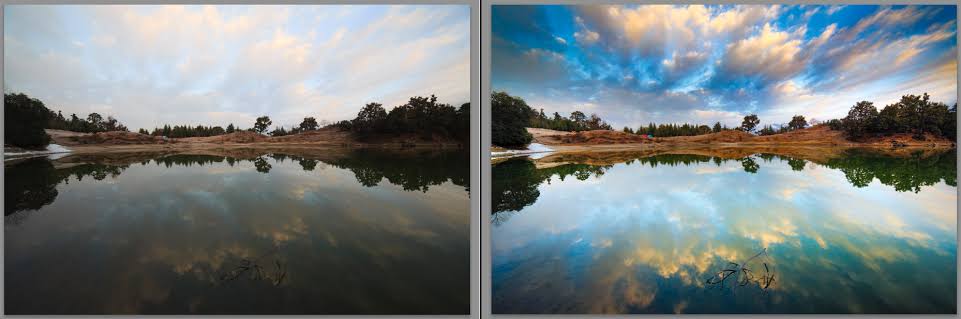
• Removing Backgrounds: Sometimes, the background of a photo can distract from the subject. With photo editing, you can remove the background entirely or blur it to make the subject stand out more. Tools like "select subject" and background erasers make this process easier.
• Filters and Presets: Filters are pre-set adjustments that apply a specific look to a photo. They’re great for quickly changing the vibe of an image. Presets are similar but are more customizable, often used to create a consistent style across multiple images.
• HDR (High Dynamic Range) Photography: HDR is a technique that combines multiple exposures to create an image with a broader range of light and dark details. It’s especially useful in landscape photography, where lighting conditions can be challenging.
•• Creative Edits:
Double Exposure: A technique where two images are merged to create a surreal or artistic effect.
Adding Text: Adding text or graphics to photos is a common practice in creating posters, social media content, or advertisements.
Compositing: Combining multiple photos into a single image to create something entirely new, like putting a person in a different background or adding elements like stars or clouds.
• Editing for Social Media: Social media platforms often require photos that are optimized for specific dimensions. Cropping and resizing your images, adding filters, and enhancing details can help your photos stand out on platforms like Instagram, Facebook, and Twitter.
•• Photo Editing Apps:
Adobe Photoshop: The most powerful and widely used photo editing software. It’s ideal for professionals who need complete control over every detail.
Lightroom: A more user-friendly option for editing exposure, color, and tone. Lightroom is popular for photographers who focus on batch editing and overall consistency.
Snapseed: A versatile mobile app that offers a wide range of editing tools for quick and effective photo adjustments on the go.
VSCO: Known for its stylish filters and easy-to-use interface, VSCO is popular among casual editors and social media influencers.
• Editing for Print: When preparing images for printing, it’s important to adjust the resolution and color profile. You’ll need to ensure your image is at a high enough resolution (300 DPI is ideal for print) and that the colors are in CMYK mode rather than RGB for accurate printing.
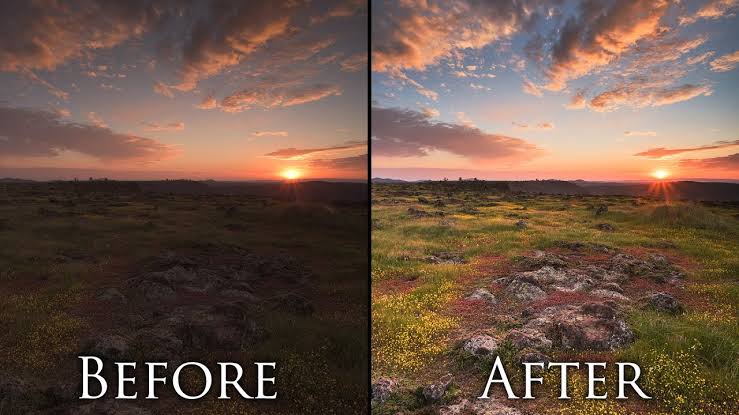
• Ethical Considerations: While editing can enhance photos, it’s essential to maintain honesty in your edits, especially in journalism or documentary photography. Over-editing can create unrealistic expectations, especially in portrait photography, so aim for a balance between enhancement and authenticity.
• The Power of Photo Editing in Storytelling: Through editing, you can change the mood, focus, and message of an image. A simple shift in contrast or color can transform a photo from ordinary to powerful, enabling you to tell a compelling visual story that resonates with viewers.
• The Future of Photo Editing: As technology advances, photo editing tools are becoming more intuitive, AI-powered, and accessible. Features like automatic enhancements, object removal, and advanced filters will make editing even more seamless, allowing creatives to focus more on their vision.
Conclusion:
Photo editing is a skill that empowers you to bring your creative ideas to life, whether for personal enjoyment or professional purposes. By mastering the tools at your disposal, you can transform a simple photograph into
a masterpiece, telling stories in ways words alone cannot.
Signing off
Prasad Mhakale

Please sign in
Login and share